Attach an FX Order to Trades

International Stock Purchases Made Easy
Trader Workstation (TWS) makes it easy to attach an FX Order to your international stock order to help you have enough funds in the stock's currency to complete the trade while avoiding any interest charges from financing the purchase.
To attach an FX order to your trade, load the ticker you wish to purchase into the order entry panel and click the buy button. Then:
- Enter the quantity, price and time-in-force for the trade.
- Click the "Advanced" button
- Expand the Hedge Button
- From the first input drop-down, select FX order
- TWS will autodetect the correct currency pair based on your account's base currency and the currency for the shares you are purchasing, as well as the buy/sell portions of the trade.
- If needed, click the box next to FX Hedge
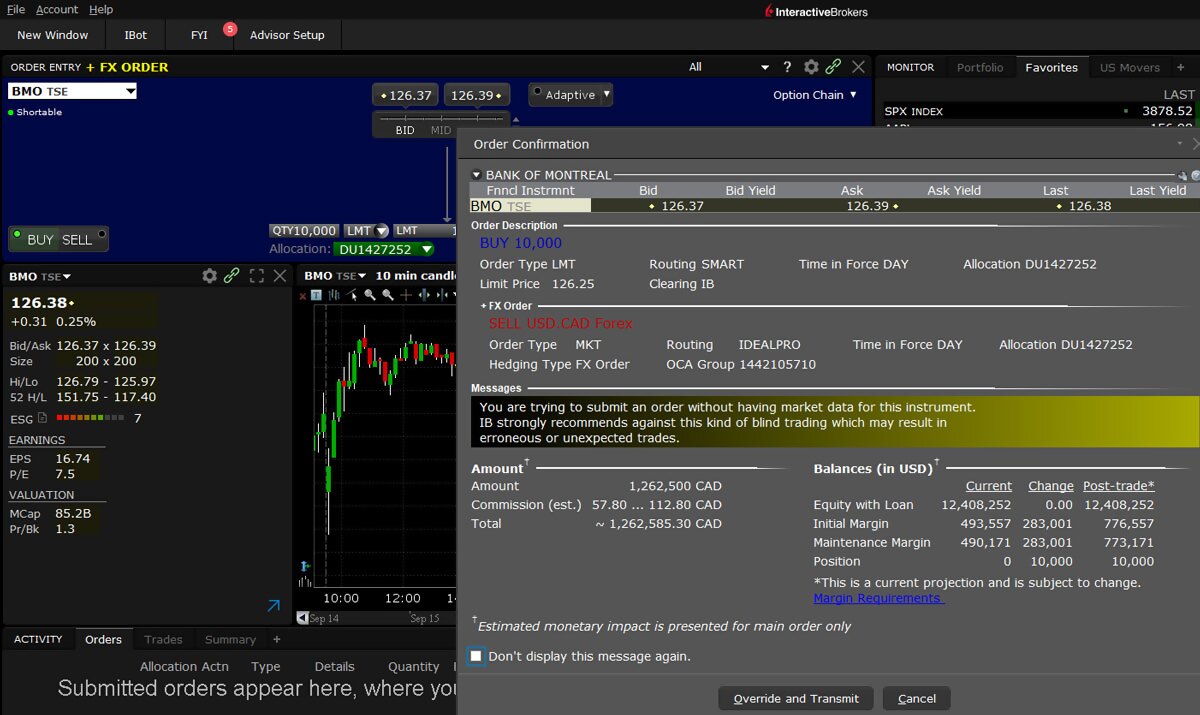
The Order Entry panel will then add "+FX Order" in yellow font to confirm that the FX Order was added to the stock order.
Already a client?
Try it in TWSLearn more about attaching FX orders
View Traders' Academy CourseUSER GUIDES
Get Started with Attaching FX Orders
For more information on attaching FX Orders, select your trading platform.
Disclosures
There is a substantial risk of loss in foreign exchange trading. The settlement date of foreign exchange trades can vary due to time zone differences and bank holidays. When trading across foreign exchange markets, this may necessitate borrowing funds to settle foreign exchange trades. The interest rate on borrowed funds must be considered when computing the cost of trades across multiple markets.