Integrated Stock Window

Integrated Stock Window
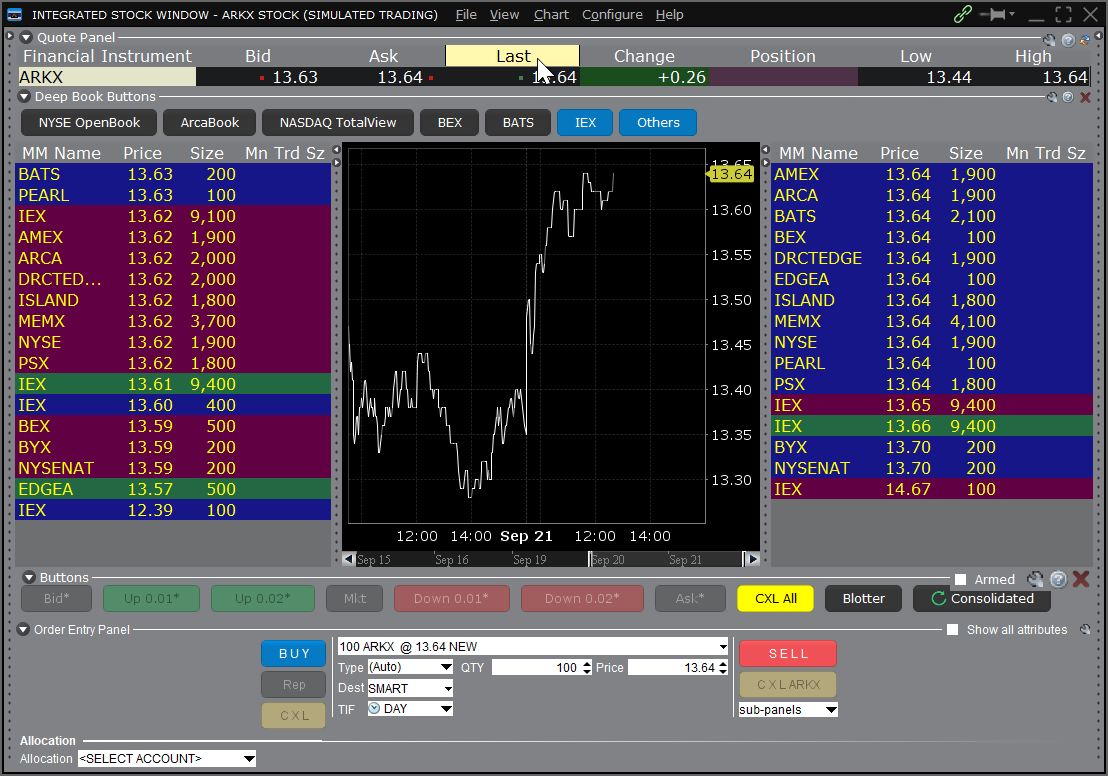
The Integrated Stock Window is a dynamic, customizable window that includes the data and order management tools you need to analyze the current market, track activity, make trading decisions and place orders for a selected security.
You can elect to work with any or all elements, including charting, real-time Level I and Level II data, account and trade information, and trade with comprehensive, instantaneous order entry.
- Use any available order type, including complex algos, from the Order Entry Panel. You can also add sub-panels, price buttons and convenient drop-down selection boxes.
- Use the single-click toggle to switch the Quote display between a table and text view.
- Customize the Level II data display and add or remove market center data with a click.
- Easily access other TWS trading tools such as BookTrader, OptionTrader, FXTrader, BasketTrader, Rebalance and SpreadTrader.
- For Your Eyes Only: your pending orders are positioned and highlighted in the ISW Deep Book panels to show you where your order stands relative to the book.
Access the Integrated Stock Window in Trader Workstation
Download TWSUSER GUIDES
Get Started with the Integrated Stock Window
For more information on using the Integrated Stock Window, select your trading platform.